Captain's Log
The Captain's Log is one journal entry per EVE day, kept for the whole account rather than any single pilot. Each day rolls up what happened across every character on your roster, so the log reads as the account's story: the goal you set, the reasons behind a build, the kills and losses, and what you plan to do next. You write the narrative parts; Pod fills in the automated tallies.
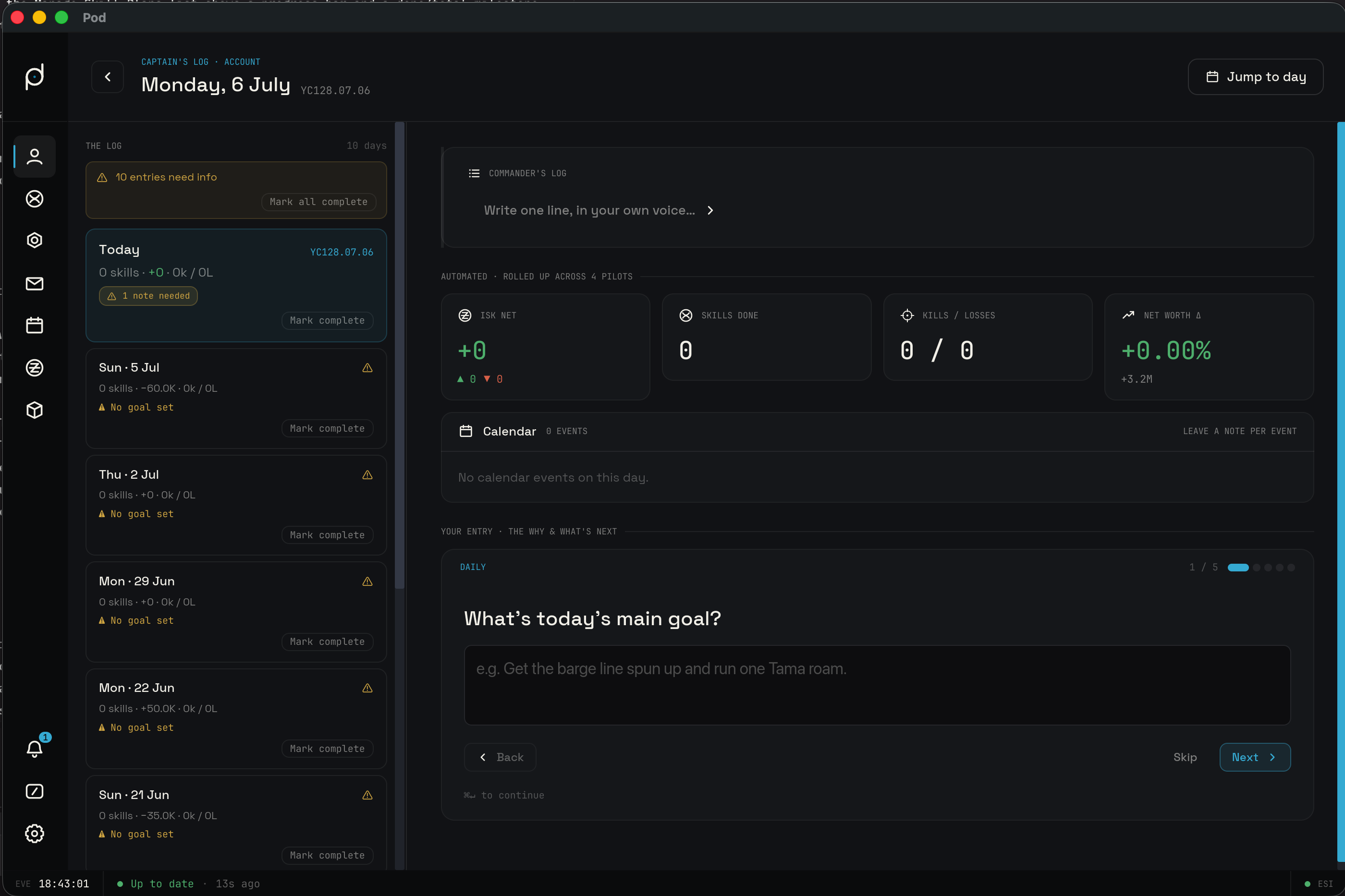
Opening the log
There are two ways in, both from the Roster window. The Utilities dropdown at the left of the roster search bar carries a Captain's Log entry, described as a daily account journal. The left rail also lists Captain's Log under the Roster section, where it sits ahead of Manage Contact Syncs in the cascade.
The header names the view. On the current day it reads Captain's Log · Account with a Today's entry title; on a day you have paged back to it reads Captain's Log · Past entry instead. A Log the day button starts the guided wizard, Jump to day opens the calendar, and once you have moved off the current day a Back to today control returns you to it.
The Commander's Log
The narrative is the free-text heart of the entry, headed Commander's Log. It
is one line in your own voice: the empty field prompts you to write one line, and
the editor placeholder reads One line, in your own voice. Write it, then
Save, or Cancel to back out. A past day with nothing written reads No commander's log written for this day.
The guided daily wizard
Log the day opens a guided wizard that walks the day's questions one at a
time. The prompts are grouped into Daily, Because of today, and Looking
ahead. The core prompts ask things like What's today's main goal? and What are you blocked on right now?, and the forward-looking group ends on a Next concrete goal. The Because of today group only surfaces the prompts the
day earned: a prompt appears because an industry job finished, because kills and
losses were logged, or because a skill finished training.
Each screen carries the question, a text field, and the keyboard hint ⌘↵ to continue. Move through with Next and Back, or Skip a prompt you have
nothing to say about. When a day logged combat, the wizard folds in a per-kill
debrief, badged Combat debrief · engagement N of M, so each engagement gets
its own screen.
The wizard ends on a review screen that reads Entry saved and lists every prompt with its state. Anything you left blank or skipped shows an add-now prompt so you can fill it in without walking the whole flow again. From the review you can Save entry, or choose Continue editing to step back through the questions.
Marking entries complete
The entries list gives you two easy outs on the day rows. Mark complete settles a single day whose prompts you are done with, and Mark all complete clears the whole backlog at once, so a stretch of days you do not intend to annotate stops asking for input.
Automated rollup tiles
Below the narrative, Pod fills in what actually happened. The tiles are Automated, rolled up across every pilot on the roster, and cover:
- ISK net, the day's wallet movement across the account.
- Skills done, the skills that finished training that day.
- Kills / Losses, the day's combat tally, with a Kills & losses panel breaking out each engagement.
- Net worth Δ, the change in the account's estimated net worth against the prior snapshot.
- Industry, the industry jobs that completed, counted as jobs.
These are read-only. They come from the same syncs that feed the rest of Pod, so the log agrees with your wallet, kill log, and net worth chart without any double entry.
Calendar events
The day view carries a Calendar section listing the EVE calendar events that
fell on that day, each with its RSVP state: Accepted, Declined,
Tentative, or Not responded. You can leave a note per event: Add
note opens a field placeheld Note on this event…, and Save note keeps it.
A day with nothing scheduled reads No calendar events on this day.
Browsing the log
The entries list, headed The log, is how you move through past days. Each row
carries the day, its combat tally written as Nk / NL, a skills count, and
badges that flag an entry still missing input, such as No goal set or Loss
debrief missing. The list scrolls on its own so a long history stays in reach.
Days are labeled in EVE's own calendar, so a row or header reads as a YC date
like YC128.07.05 rather than a Gregorian one. When a day carries several combat
debriefs, a snapshot pager steps through them one at a time with a N / N
counter.
To land on a specific day, use Jump to day. It opens a calendar you can page by month; pick a date to jump straight to that day's entry, or use Today to snap back to the current one.
Reminders and nudges
Pod prompts you to keep the log up without nagging. Once a day, a system notification titled Fill out your Captain's Log reminds you that the day's entry is not finished yet. Inside the app, the roster shows a daily nudge popup titled What are you flying toward today? that asks you to set one goal for the account and promises to roll up what happened by nightfall. Its buttons are Set today's goal and Later.
Killmail after-action reports
Every killmail gets its own debrief, so a kill or loss you want to learn from lands in the log tied to the engagement. Open a killmail's window and it carries two tabs: Overview, the usual breakdown of the fight, and Report, the after-action writeup.
The Report tab is a short debrief. Set the Outcome with Went well, Went poorly, or Lesson learned, answer What happened? and Would you do anything differently?, and distill it to a Key takeaway (one line). Save report files it, and once saved the tab shows when it was logged with an Edit to revise. Those reports feed the day's combat debrief in the wizard, so the log and the kill log tell the same story.